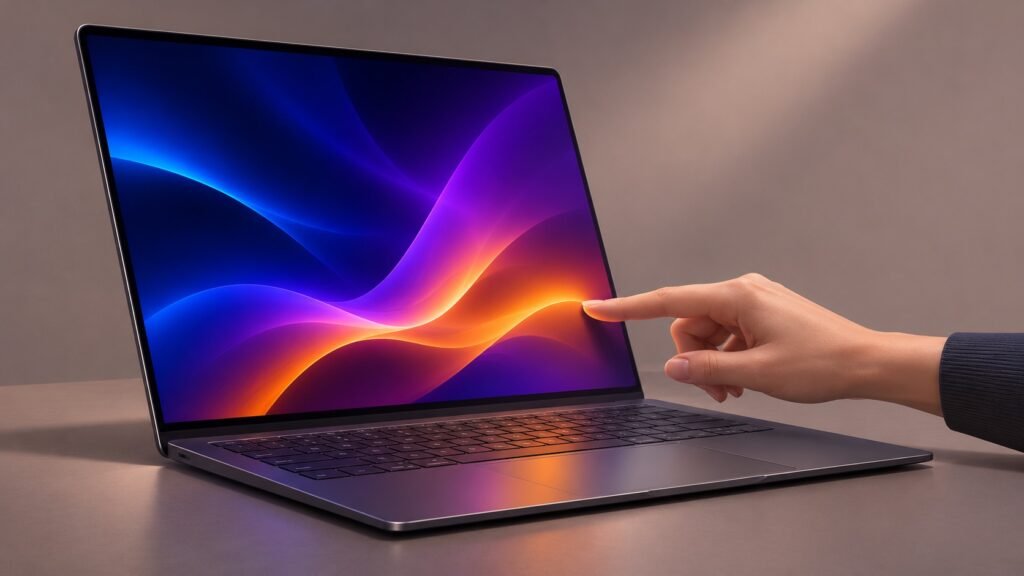
The touchscreen MacBook Pro is no longer a rumour. Apple’s new MacBook Pro with PROLED XDR Display begins Australian availability on Friday, 6 November 2026, combining a tandem OLED screen with direct touch input, M5 Pro or M5 Max chips, and a lighter design.
For buyers, the important question is not simply whether a Mac finally has a touchscreen. It is whether the display, portability and professional features justify the price. Here is what Apple has confirmed, how the new models differ from the M6 MacBook Pro, and who should consider upgrading.
What is the touchscreen MacBook Pro?
Apple announced the new models in its Australian Newsroom release on 29 October. They come in 14-inch and 16-inch sizes, with M5 Pro or M5 Max configurations. Apple’s official name is MacBook Pro with PROLED XDR Display.
These are confirmed shipping products, not leaks or predictions. Apple lists 6 November as the start of customer deliveries and availability through Apple Stores and authorised resellers. That does not guarantee every configuration is immediately in stock: check your postcode, preferred store and delivery estimate before ordering.
PROLED XDR: why the OLED display matters
The headline screen change is tandem OLED. Instead of relying on a separate backlight, the display uses self-illuminating pixels. For everyday users, that means deeper blacks and no mini-LED-style halos around bright objects on dark backgrounds.
Apple specifies up to 2,000 nits peak HDR and SDR brightness, a 10,000,000:1 contrast ratio, adaptive refresh rates up to 120Hz, and support for both P3 and Adobe RGB colour spaces. Those colour options are particularly relevant to photographers, designers and people preparing images for print.
Peak brightness is not the same as sustained full-screen brightness. Apple’s Australian comparison page lists up to 1,000 nits sustained full-screen brightness, subject to its stated conditions. Treat the larger headline figure as a peak capability, not a promise that the entire display stays at that level continuously.
An optional nano-texture finish reduces glare further. Compare it with the standard finish in person if reflections affect your work; it is a more useful buying test than deciding from specification numbers alone.
How touch changes everyday Mac use
Touch works alongside the keyboard and trackpad rather than replacing them. Apple describes gestures including scrolling, pinching to zoom, dragging content, and arranging windows. macOS can translate touches into clicks, so many existing apps work without a dedicated touch redesign.
That could be handy for browsing photos, manipulating a 3D scene, playing onscreen instruments or testing mobile apps. It does not mean every application suddenly becomes an ideal finger-operated interface, and reaching towards an upright screen may be less comfortable than using the trackpad for long sessions.
In his 5 November review for 9to5Mac, Chance Miller describes touch as a useful optional addition rather than a complete reinvention of his workflow. That is a reviewer’s assessment, not our own hands-on testing, but it supports a sensible approach: buy for the whole laptop, not touch alone.
Performance, ports and software
The OLED MacBook Pro uses M5 Pro or M5 Max, with configurations reaching up to 128GB of unified memory and 16TB of storage. These are maximum options across the range, not the specification of every model.
Apple also lists three Thunderbolt 5 ports, HDMI, an SDXC card slot, MagSafe, a headphone jack, Wi-Fi 7 and Bluetooth 6. The Dynamic Island brings a new location for features such as Spotlight and Live Activities.
Apple advertises up to 24 hours of battery life, but actual endurance depends on configuration, brightness and workload. Heavy rendering or large local AI workloads should not be expected to match a controlled battery test.
The laptops run macOS 27. If you are moving from an older Mac, our macOS 27 Golden Gate guide explains the software transition. Check essential apps and peripherals, and make a current backup before migrating.
Australian prices and the M6 distinction
Apple’s published Australian starting prices include GST:
- 14-inch PROLED XDR with M5 Pro: A$4,599.
- 16-inch PROLED XDR with M5 Pro: A$5,499.
- 14-inch PROLED XDR with M5 Max: A$6,999.
- 16-inch PROLED XDR with M5 Max: A$7,699.
Do not confuse these with the separate 14-inch M6 MacBook Pro, which starts at A$3,199 including GST. That model has a Liquid Retina XDR mini-LED display, not the PROLED touchscreen.
The chip names can be confusing: a higher generation number does not automatically make a base chip the right replacement for a Pro or Max configuration. Compare memory, graphics requirements, external-display needs and your actual software rather than choosing by the number alone.
Should you buy or keep your current Mac?
Consider upgrading if your current laptop struggles with paid creative work, you need a better built-in display, or you want the new portability and touch features together. Photographers and video editors have stronger reasons to investigate PROLED XDR than someone who mainly writes documents.
Keep your current Mac if it already runs your apps comfortably and the screen meets your needs. For email, study and routine office work, an expensive display upgrade may not deliver enough practical benefit.
Before buying, try touch in the applications you actually use. Then price the memory and storage you need, not just the entry configuration. The premium is easier to justify when it solves a recurring problem.
Final thoughts
The touchscreen MacBook Pro combines a meaningful display upgrade with a new way to interact with macOS. For Australian buyers, the best decision starts with workload, screen quality and total configuration cost. Touch is a welcome option, not a reason every Mac owner needs to replace a perfectly capable laptop.
FAQs
When is the touchscreen MacBook Pro available in Australia?
Apple lists Friday, 6 November 2026 as the start of availability. Delivery dates and local stock vary by configuration and location.
Does the M6 MacBook Pro have a touchscreen?
No. The new 14-inch M6 model uses a non-touch Liquid Retina XDR display. Touch is offered on the PROLED XDR models with M5 Pro or M5 Max.
How much does the touchscreen MacBook Pro cost?
Australian starting prices are A$4,599 for the 14-inch M5 Pro configuration and A$5,499 for the 16-inch M5 Pro configuration, including GST.
Must you use touch instead of the trackpad?
No. Touch is an additional input method. The keyboard, trackpad and familiar Mac workflows remain available.
Leave a Reply