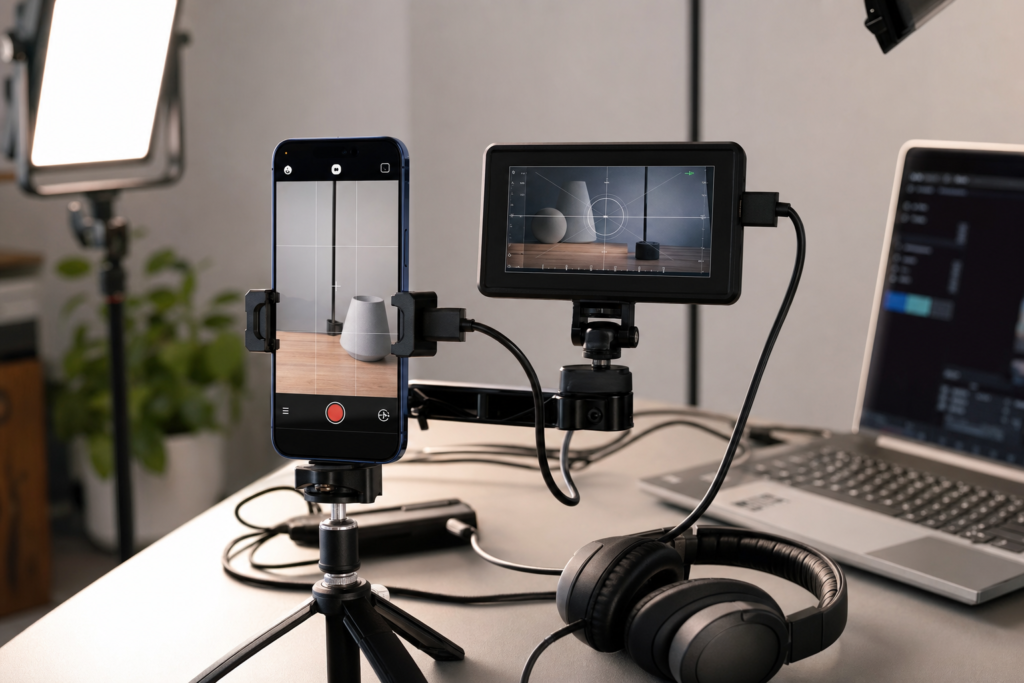
Final Cut Camera Clean HDMI support is the latest reason serious iPhone video creators may want to look again at Apple’s free Final Cut Camera app. According to recent reporting from 9to5Mac, Apple has added a new Clean HDMI Out option for iPhone 17 Pro models, giving creators a more practical way to send a clean video signal to an external monitor, recorder, or streaming workflow.
Apple’s own Final Cut Camera 2.0 announcement already positioned the app as a pro-focused capture tool for iPhone, with support for features such as ProRes RAW and genlock on iPhone 17 Pro and iPhone 17 Pro Max. The new Clean HDMI Out addition builds on that direction: it is less about casual clips and more about turning the iPhone into a controlled production camera.
What is Final Cut Camera Clean HDMI?
Clean HDMI Out means the iPhone can output a video feed without the usual on-screen controls, overlays, recording buttons, or interface elements appearing on the connected display. In practical terms, the external screen sees the camera image, not the app interface.
That sounds small, but it matters in real production work. If you connect an iPhone to a monitor, capture card, switcher, or external recorder, you do not want focus boxes, menus, or status icons burned into the signal. A clean feed makes the iPhone 17 Pro camera more useful for livestreaming, interviews, product demos, educational videos, and small studio setups.
Why it matters for iPhone 17 Pro users
The iPhone has been capable of excellent video for years, but professional workflows often depend on predictable outputs. The Final Cut Camera update helps bridge the gap between phone filming and camera-style production because it gives creators more control over how the signal leaves the device.
For everyday users, this is not a must-use feature. Most people recording family videos, travel clips, or social content can keep using the standard Camera app. But for creators who already use tripods, lights, microphones, external displays, or Final Cut Pro, Clean HDMI Out is a meaningful upgrade.
Key details in the Final Cut Camera update
Clean HDMI Out is aimed at external displays
The main benefit is simple: connect the iPhone to compatible external gear and get a cleaner preview or recording signal. This can help when a director, presenter, or camera operator needs a bigger display than the iPhone screen.
It is especially useful for livestreams
Creators using a capture card can potentially treat the iPhone as a high-quality camera source. A clean feed is important for YouTube streams, webinars, remote interviews, and hybrid events because viewers should see the image, not the camera app controls.
It fits Apple’s broader pro video push
Apple has been steadily expanding the iPhone’s video capabilities with tools such as ProRes, Log recording, Final Cut Camera, and tighter Final Cut Pro integration. Clean HDMI Out continues that pattern by making the iPhone 17 Pro and iPhone 17 Pro Max more flexible in production environments.
How this affects creators and Apple users
If you are a mobile filmmaker, the update may reduce the need for a separate camera in smaller shoots. The iPhone 17 Pro can already be convenient because it is portable, familiar, and easy to pair with apps. Clean HDMI Out adds another reason to use it as part of a compact studio kit.
For Mac users, the feature also makes sense as part of a larger Final Cut Pro workflow. Shooting on iPhone, transferring files to a Mac, and editing in Final Cut Pro can now feel more like one connected production chain. Apple’s ecosystem advantage is not just the hardware; it is the way capture, transfer, editing, and publishing can work together.
If you are following Apple software updates more broadly, you may also like our recent guide to iOS 26.6 Beta 3, which explains what iPhone and iPad users should know before installing beta software.
Should you use Final Cut Camera instead of the Camera app?
Use the regular Camera app if you want quick, simple video. It is faster for everyday recording and easier for casual users. Use Final Cut Camera if you want more manual control, a creator-focused interface, and features designed around production workflows.
The biggest reason to try Final Cut Camera is not one single feature. It is the combination of manual controls, Apple’s pro formats, external workflow support, and better integration with Final Cut Pro. Clean HDMI Out simply makes the app more useful for people who need a clean monitoring or capture signal.
Should users take action?
If you own an iPhone 17 Pro or iPhone 17 Pro Max and use Final Cut Camera, check the App Store for the latest version of the app. Before relying on Clean HDMI Out for paid work, test your full setup: cable, adapter, monitor, capture card, audio source, storage, battery, and heat management.
If you do not own an iPhone 17 Pro model, this specific feature may not be available to you. However, Final Cut Camera can still be worth exploring if you want more control than the standard Camera app provides. Apple’s newer creator tools are clearly designed to make the iPhone a more serious video device, even if the most advanced options remain tied to Pro hardware.
Final thoughts
Final Cut Camera Clean HDMI is not a flashy feature for everyone, but it is exactly the kind of practical upgrade that creators notice. It makes the iPhone 17 Pro more useful in studio, livestreaming, and external monitoring setups, while strengthening Apple’s overall mobile filmmaking story.
For most iPhone users, the regular Camera app remains enough. For creators, educators, streamers, and small production teams, this update is worth testing.
FAQs
What does Clean HDMI Out mean on iPhone?
It means the iPhone can send a clean camera feed to an external display or recorder without showing app controls or interface overlays.
Which iPhone models support Final Cut Camera Clean HDMI?
Recent reporting says the Clean HDMI Out feature is exclusive to iPhone 17 Pro models. Check Apple’s app notes and device compatibility before planning a shoot around it.
Is Final Cut Camera free?
Yes. Final Cut Camera is available as a free Apple app, although some advanced features depend on the iPhone model and software version.
Do normal iPhone users need this feature?
Most casual users do not need Clean HDMI Out. It is mainly useful for creators, livestreamers, filmmakers, educators, and people using external production gear.
Can Clean HDMI Out replace a dedicated camera?
For some lightweight shoots, it may be enough. Dedicated cameras still offer advantages such as lens flexibility, long recording setups, and specialised accessories, but the iPhone is becoming more capable for compact productions.
Leave a Reply